
4 min read

What Microsoft's Scan-to-Email Update Means for Your Workflow

What Microsoft's Scan-to-Email Update Means for Your Workflow
What Microsoft's Scan-to-Email Update Means for Your Workflow
5:55

There is a major email security update from Microsoft that will disrupt scan-to-email workflows for many businesses unless action is taken before March 1st. 

If your organization uses multifunction printers (MFPs), this will impact your ability to scan-to-email submissions through Office 365 or Exchange Online. Modern Authentication will replace Basic Authentication with more secure protocols such as OAuth 2.0 and SAML for cloud services.

March 1st, 2026, Microsoft will begin rejecting all Basic Authentication SMTP email submissions in Microsoft 365 and Exchange Online. By April 30th, 2026, Microsoft is aiming to have completely retired Basic SMTP Authentication. Businesses that have not updated their devices will not be able to scan-to-email at all. This change will retire legacy login methods that expose credentials (username and password) in plaintext to improve email security.

In simple terms, if your scanners or printers use a username and password to send email, they will stop working in 2026. You will need to update, reconfigure, or replace your devices to continue any scan-to-email functionality.

What Is Basic Authentication, And Why Is It Being Discontinued?

Basic Authentication requires a static username and password to connect to the Microsoft 365 SMTP service. These credentials are transmitted in a way that makes them vulnerable, increasing the risk of credential theft, phishing, and brute-force attacks. Microsoft's discontinuation of this login method is part of a broader move towards more secure Modern Authentication workflows.

What Is Modern Authentication, And How Does It Work?

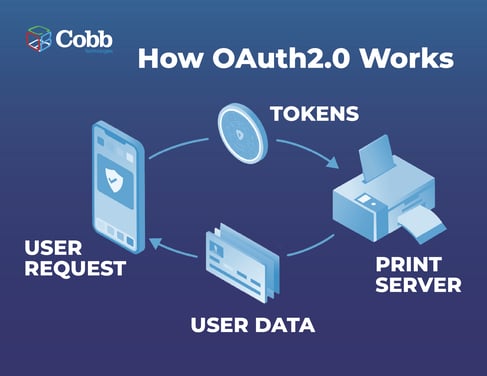
Modern Authentication uses advanced methods like OAuth 2.0 authentication, which replaces passwords with temporary tokens when scanned documents are sent via email. Instead of storing a username and password on the device, tokens are issued and validated securely, reducing credential exposure.

This means that new scan-to-email setups rely on token-based permissions, supporting identity and access controls, unlike basic authentication, which uses older, insecure login flows.

HowOAuth2.0Works-1


How Does OAuth 2.0 Improve Security For Scan-to-Email Workflows?

OAuth 2.0 improves security by eliminating the need for static login credentials during the scan-to-email process. Using temporary access tokens ensures that credentials aren’t stored on the device or transmitted in plaintext, which is a core weakness of Basic Authentication.

This token-based security method also supports stronger compliance requirements and reduces risk for organizations concerned about data breaches, credential theft, and unauthorized access.

Which Devices And Workflows Are Affected By This Microsoft Change?

Any multifunction printer (MFP) scan to email setup or other device that uses Basic Authentication with Microsoft 365 or Exchange Online SMTP will be affected when authentication stops working in March.

Businesses that rely on Basic Authentication will be unable to send scanned files by email, which leads to print workflow problems that interrupt document processes that many teams depend on for approvals, invoicing, onboarding, and records management.

Fortunately, most major MFP manufacturers, including HP, Konica Minolta, Canon, and others, have published guidance acknowledging the impact. t

How to Avoid Workflow Disruptions

To avoid disruption to your workflows, consider taking these steps:

  • Audit Devices
    Inventory all multifunction printers and scanners that use scan-to-email with Microsoft 365 or Exchange Online. Older devices without OAuth 2.0 support will fail after the deadline.

  • Verify OAuth 2.0 Compatibility
    Check with your manufacturer or vendor to confirm whether firmware updates enable OAuth 2.0 Modern Authentication. If no update path exists, the device won’t be able to authenticate with Microsoft’s servers.

  • Select a Transition Approach
    Organizations generally have three options:

    • OAuth 2.0 Modern Authentication - For devices that support token-based logins.

    • SMTP Relay - Uses an Office 365 relay secured by IP instead of device-level credentials.

    • Alternative Email Services - Third-party SMTP or print management platforms (e.g., uniFLOW, PaperCut) that offer scan-to-email functionality.

How Does This Change Impact Overall Print And Document Workflows?

This authentication shift impacts not just scan-to-email but the broader print workflow problems that occur when fundamental services change. When a workflow, such as emailing scanned documents, suddenly stops working, teams lose time and productivity. You will need to update or replace devices that use basic authentication. By doing so, organizations can ensure that critical document workflows stay uninterrupted and continue to support day-to-day operations.

Need Help Staying Ahead of the Curve?

Managing these transitions can be a daunting task, keeping you from focusing on what matters most. For businesses to take control of print costs and fleet performance, looking to reduce waste, right-size equipment, and gain visibility into real print behavior, Cobb’s Managed Automated Print Services (MAPS) program offers a complimentary Fleet Assessment. It’s a simple first step to uncovering cost drivers, usage patterns, and opportunities for a more efficient print environment, making sure your devices work for you, not against you.

If you’re seeking expert guidance, troubleshooting support, or want to explore workflow improvements, our team is ready to help. Schedule a call with our service or sales specialists, and we’ll walk through your questions, goals, or upcoming initiatives to help you move forward with clarity.

Works Cited: 


FAQ About Scan-to-Email

How Does Scan-to-Email Work?

Scan-to-email lets a multifunction printer (MFP) convert a paper document into a digital file and send it directly to an email inbox without using a computer. The device essentially acts as a small email client, connecting to your organization’s SMTP server to deliver the scanned file. To work properly, the MFP must be configured with the mail server’s settings and authentication method. This process keeps documents moving quickly through the business, which is why changes to email authentication can create workflow disruptions when devices aren’t updated.

What Will Happen If Businesses Don’t Prepare Before April 2026?

If businesses don’t update or replace devices that rely on Basic Authentication, their scan to email workflows will fail. Users will be unable to send scanned files by email, which interrupts document processes that many teams depend on for approvals, invoicing, onboarding, and records management.

This disruption is more than a “printer setting issue”,  it’s a workflow problem that affects productivity and daily operations.

What If My MFP Doesn't Support OAuth2.0?

Some older devices may not support OAuth 2.0 or have no firmware path to enable it. In those cases, replacing the machine with a newer model that supports Modern Authentication may be the only way to maintain scan-to-email functionality.

This is more than just a hardware upgrade — it’s enabling a secure and compliant email submission workflow that aligns with Microsoft’s 2026 requirements.

Can Scan-to-Email Still Work Using SMTP?

Yes. An SMTP relay Office 365 setup allows devices to send emails to Exchange Online without requiring Modern Authentication at the device level. Instead, authentication is secured by whitelisting trusted IP addresses.

While this doesn’t replace the security benefits of OAuth 2.0, it does allow scan-to-email to continue working on devices that cannot support Modern Authentication. Businesses should weigh this against their security policies and compliance requirements.

What Microsoft's Scan-to-Email Update Means for Your Workflow

10 min read

What Microsoft's Scan-to-Email Update Means for Your Workflow

There is a major email security update from Microsoft that will disrupt scan-to-email workflows for many businesses unless action is taken before...

Best IT Strategies for Law Firms Going Into 2026

11 min read

Best IT Strategies for Law Firms Going Into 2026

Why should a law firm invest in a strong modern IT strategy? Today’s legal teams depend on secure, reliable technology to protect sensitive...

We “LOUVRE” Strong Passwords: How a Weak Password Can Lead to Big Losses

2 min read

We “LOUVRE” Strong Passwords: How a Weak Password Can Lead to Big Losses

The Louvre’s password became the punchline of a global story after a heist revealed major security concerns for the museum. Reports say the password...