6 min read
How to Defend Your Business From Cyber Threats
Don't Let Cyber Threats Haunt Your Business Picture this: your office receives an email from a previous vendor requesting payment on an updated...
Picture this: your office receives an email from a previous vendor requesting payment on an updated invoice. Everything in the email checks out and seems valid. But the email didn't come from the vendor at all, and now your business is at risk of a breach.
Unfortunately, this situation is common. The FBI's 2025 Internet Crime Report found that 'reported losses from cyber-enabled crime reached nearly $21 billion in 2025, a 26% increase from the previous year.'(1) Today, attackers design their messages to blend in with the other emails that land in our inboxes every day, so nothing raises an alarm.
In this article, we'll look at how everyday decisions can create security gaps and follow the stages of a typical cyberattack, from the first click to the impact on your business. Along the way, we'll show where simple habits and the right protections can stop an attacker before the damage is done.
Most cyberattacks disguise themselves as the vendors, software platforms, and services people already know and trust. That makes a request for information feel routine, and people are less likely to question a source they trust.
In our experience, the messages that look the most ordinary are often the most dangerous. It could be a fake sign-in page asking you to re-enter your credentials, a request to pay an updated invoice, or an email from software you use daily asking you to update your card information. There are many ways cyber threats can catch us with our guard down, which is why it's important to understand the warning signs.
Some phishing attempts steal login credentials, giving attackers access to email accounts, financial systems, or cloud platforms. Others deliver malware that can spread through your network, escalate privileges, or maintain a hidden presence on compromised systems. According to the joint CISA, NSA, and FBI Phishing Guidance (October 2023), 'phishing falls into two common tactics: phishing to obtain login credentials and phishing to deploy malware.'(2)
The good news is that a single click on a phishing link doesn't automatically mean your entire system is breached. What matters is the protections you have in place, what the link does, and how quickly you respond.
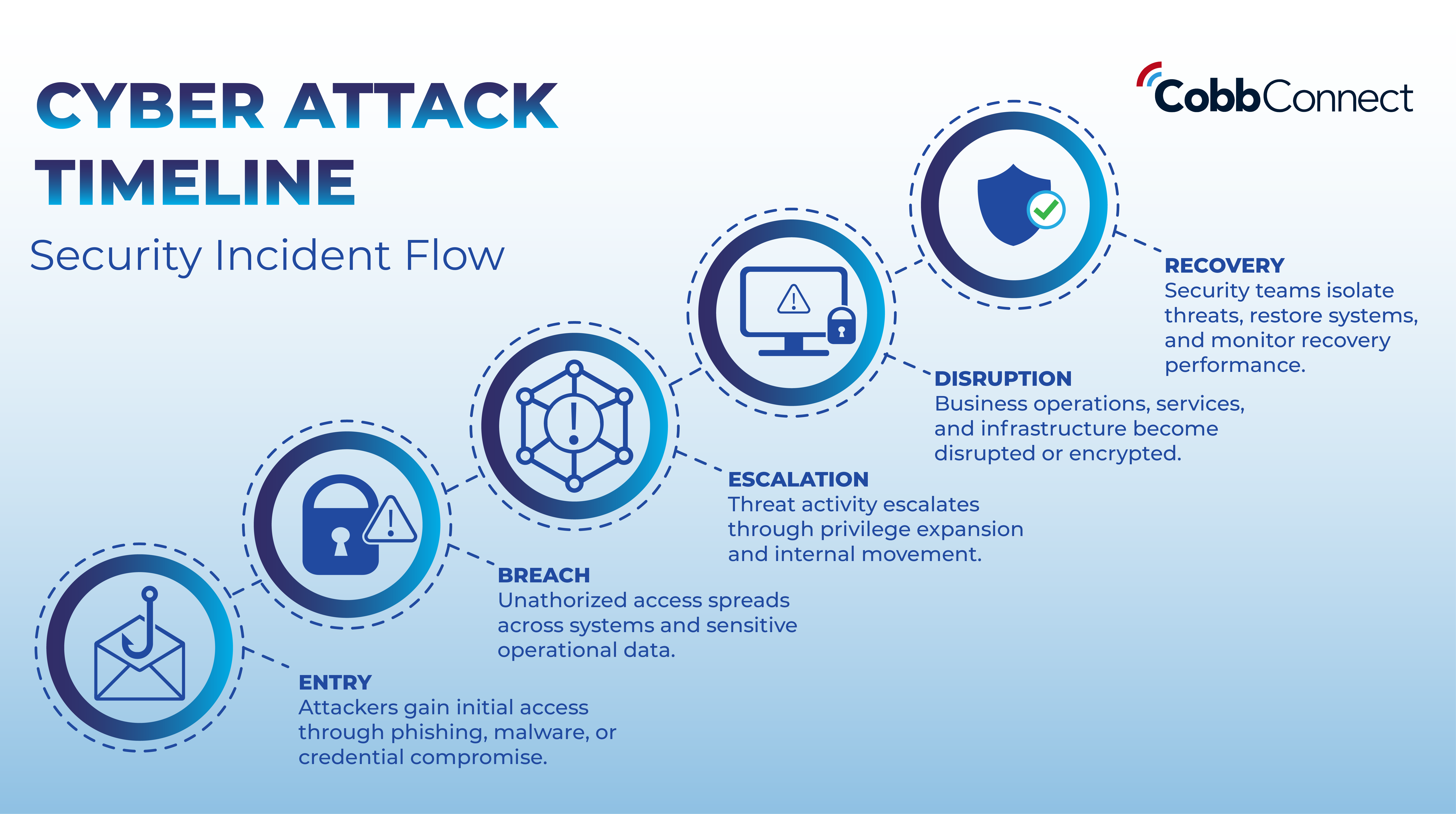
There's no reliable way to measure the average timeline of a cyberattack, because attackers have so many ways into a network. But most attacks follow a similar path, and every stage is a chance to stop them:
The more you know about these stages, how to prevent them, and how to react, the faster and more securely a breach can be contained and removed.
Phishing goes well beyond email. Attackers can place phone calls and use AI voice models to imitate colleagues or representatives you've spoken with before. They can also create fraudulent websites, pop-ups, Wi-Fi networks, and even social media accounts.
Watch the video below to see how misleading cyberattacks can be and test your instincts!
These attempts often borrow from the websites you visit, the services you subscribe to, and the software you use every day. For example, you might get an email from "Google" saying your storage is low and you must enter your card information through a payment link. Without a trained eye, it looks like a normal alert, when it's really an attempt to steal your information.
Familiarity makes us more trusting, and we often don't confirm someone's identity, especially over the phone. This is where security awareness training comes into play, and why verification through trusted channels matters. If a caller requests a sensitive action, hang up and call them back at the number you have on file.
The same principle applies to email. If you receive an unexpected invoice or charge, request confirmation through a known and verified contact. Don't reply to or act on the message itself until that confirmation is provided.
The strongest defense against phishing, scams, and social engineering is a simple set of steps. It works best when it's part of a routine security check, not something your team does only occasionally.
| Pause before acting | Attackers create pressure and urgency because it reduces our scrutiny and makes us less likely to spot fraud. |
| Verify through a separate, trusted channel | Before approving payments, sharing credentials, or downloading anything, confirm the request. |
| Report without Hesitation | The faster suspicious messages are flagged, the faster your organization can respond |
We recommend building these steps into your team's daily workflow, so they become second nature.
Your team's instincts, built through training and awareness, are one layer of defense. Strong business controls are another. Together, they reduce the damage a single click can cause and give you time to respond. Here are the gaps we see most often:
Multi-factor authentication (MFA) across your entire business. If employees aren't required to use MFA, a stolen password can give an attacker a consistent way in. MFA should be enforced across your whole business, not just for a few accounts. Where you handle highly sensitive data, consider phishing-resistant MFA, such as hardware security keys or passkeys. These are harder for attackers to intercept or redirect than SMS codes. Authenticator apps are a step up from text messages, but they're not fully phishing-resistant.
Least-privilege access. Employees should only have access to the systems and information they need for their role. That way, if credentials are compromised, the potential impact is contained. Access should be reviewed and updated as roles and responsibilities change.
Consistent security updates. Many attacks exploit known vulnerabilities in software and devices that haven't been updated. Security updates should be continuously monitored and managed across your entire business so those gaps are closed quickly.
Tested backups and a disaster recovery plan. Having backups is important, but knowing you can actually recover from an attack is just as important. Every organization should have a disaster recovery plan that outlines how it will restore operations after an incident, and the plan should be tested before you need it.
Continuous monitoring. Without monitoring and alerting, suspicious activity can go unnoticed. Your business needs automated systems that watch for suspicious activity and new vulnerabilities across your network.
Incident response preparation. A practiced response plan, supported by a clear data security policy, turns a stressful event into a manageable process. It spells out who to call, what to disconnect, and how to preserve evidence before an incident occurs. A good MSP should help you build and test these plans so that when something does happen, your team already knows the next step.
Cyberattacks rarely start with dramatic break-ins. They start with routine moments where someone trusts a message they shouldn't. The good news is that the same everyday decisions that create risk can also prevent it.
Pause before acting on unexpected requests. Verify identity through a channel you already trust. Report anything suspicious, even if you're not sure. Keep your systems updated, your access tight, your backups tested, and your response plan practiced.
These are habits you can start building this week, and they'll protect your business long after Cybersecurity Awareness Month ends.
Know what's lurking. Wondering where your business stands? Contact Cobb Connect for a FREE network assessment to identify potential security gaps across your business.
Citation List:
1. Federal Bureau of Investigation. 2025 Internet Crime Report. Internet Crime Complaint Center, 2026, www.ic3.gov/AnnualReport/Reports/2025_IC3Report.pdf
2. Cybersecurity and Infrastructure Security Agency, et al. Phishing Guidance: Stopping the Attack Cycle at Phase One. Cybersecurity and Infrastructure Security Agency, Oct. 2023, www.cisa.gov/resources-tools/resources/phishing-guidance-stopping-attack-cycle-phase-one.
This is a high-intent, urgent search, and the post only touches on it (“a single click doesn’t mean your entire system is breached”). A short answer could cover disconnecting from the network, changing passwords, reporting it, and calling your IT provider.
It ties directly to your opening scenario. The answer is to verify through a known contact and not to reply to the message itself.
This is a broad, evergreen query. It’s also the place to bring back mass versus targeted phishing (spear phishing), which the earlier draft covered and the current version dropped.
Another high-volume definition search that your voice and AI scam section supports.
Your MFA paragraph already makes this distinction. It’s a timely topic that most small businesses don’t understand yet.
The answer is to hang up and call back on a known number. This topic is trending, so it’s more likely to gain visibility.
6 min read
Don't Let Cyber Threats Haunt Your Business Picture this: your office receives an email from a previous vendor requesting payment on an updated...
6 min read
If you run IT or compliance for a healthcare organization, you've probably heard some version of "HIPAA is changing" over the past year. This is a...
3 min read
Healthcare organizations don't just need IT support; they need a partner who understands compliance, security, and what's actually at stake when...