4 min read
Microsoft's 365 SMTP Basic Auth Ends in 2026, Is Your Business Ready?
Through January 2027, Microsoft is closing out one of the last legacy login methods in Exchange Online, and the first real enforcement step lands at...

4 min read
Cobb Tech
Published
Through January 2027, Microsoft is closing out one of the last legacy login methods in Exchange Online, and the first real enforcement step lands at the end of this year. Here is what is changing, what isn’t, and how to get ahead of it while you still have time.
While this announcement may seem like Microsoft is “shutting down SMTP.” What Microsoft is retiring is Basic authentication for SMTP AUTH client submission, the method where a device or application logs in to Microsoft 365 with a stored username and password in order to send mail. Other ways of getting mail into Exchange Online, including OAuth-based sending and IP-based relay through a connector, are not part of this retirement.
That distinction matters, because it means almost every business has a path forward. The problem is that most don’t know which of their devices and systems are on the wrong side of the line.
The timeline for these changes has shifted quite a bit since Microsoft first announced the retirement in 2024. They then pushed the target to the first half of 2026, and in January 2026 published a more gradual schedule. The current plan looks like this:
Despite the frequent changes for this retirement, every business should begin taking steps to move away from this form of authentication. Here are a few examples of what businesses may experience after the final cutoff for SMTP Basic Authentication:
Scan-to-email gets the attention because everyone in the office notices when it breaks, but the real exposure is wider. Anything that stores a mailbox password and uses it to send through Microsoft 365 is a candidate:
If you’d like help with the inventory side, our complimentary Fleet Assessment gives you a clear picture of every device on your network and how it’s being used.
First, find everything that sends email through Microsoft 365 with a saved password. In the Exchange admin center, open Reports, then Mail flow, then SMTP AUTH clients. The Authentication Protocol column shows which senders still use Basic authentication. Rarely used senders can slip through, so also walk the office and ask your software vendors. Our complimentary Fleet Assessment can list every printer and scanner for you.
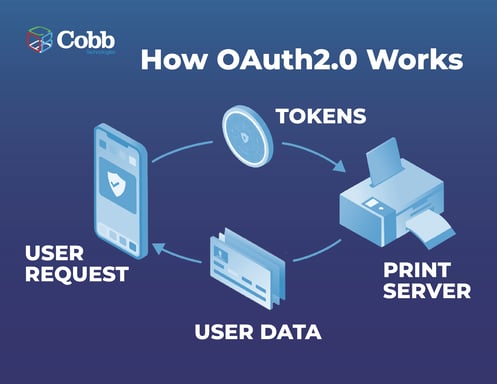
Next, match each sender to a fix. If your printer or scanner supports OAuth 2.0 (a sign-in method that uses temporary tokens instead of a saved password), update its firmware and switch it over. It is the most secure option, and our post on Microsoft’s scan-to-email update explains how it works.

If your device can’t use OAuth but has a fixed address on your network, ask your IT team to set up an SMTP relay connector, a Microsoft 365 setting that trusts approved network addresses instead of a login. Limit it to those addresses only. Business software that emails invoices or alerts needs either an update from its vendor or a different sending method.
Two shortcuts exist for email that stays inside your company: Direct Send and High Volume Email (HVE). Both only deliver to your own domain, and Microsoft is tightening Direct Send, so treat them as temporary. If a printer is too old for any of this, replacing it, or scanning to SharePoint or a shared folder instead of email, is often simpler. You can also try other methods of troubleshooting scan-to-email issues.
When December passes and something breaks, the fastest fix will be an administrator re-enabling Basic authentication. It works, and sometimes it is the right call for a sender you discover at the last minute.
But it keeps a stored password on a device and keeps your tenant exposed to the high risks Microsoft is trying to eliminate, and it only delays a decision you will have to make once the final removal date is announced. If you do re-enable it, treat it as a documented exception with an expiration date and an owner, not a permanent setting.
One more thing worth checking: if your tenant has security defaults turned on in Microsoft Entra ID, SMTP AUTH may already be disabled. Some organizations have been running without scan-to-email for a while without realizing the cause.
There are roughly seven weeks between now and the end of December. Here is one way to use them:
| WEEK 1 - 2 | Pull up the SMTP AUTH report, walk the office, build a complete list of every sender. |
| WEEKS 3 - 4 | Confirm OAuth support and firmware availability with each manufacturer or vendor, and choose a path for every sender. |
| WEEKS 5 - 6 | Configure and test, starting with one device per model. Send test scans to both internal and external recipients, since generic subject lines can trip spam filters. |
| WEEK 7 | Finish cutover before the holiday freeze, document what you did, and set a calendar reminder for the second half of 2027, when Microsoft is expected to name the final date. |
This change is manageable, and the businesses that handle it well will be the ones that started before anything broke. If you’d like a second set of eyes, Cobb can help you inventory your devices, check OAuth compatibility, and choose the right approach for each one, whether that means a firmware update, a relay configuration, or a new machine.
Schedule a call with our team, and we’ll help you get ready before the New Year.
Only if they rely on Basic Authentication and your tenant's default flips with no exception in place. Devices using OAuth or IP-based relay are unaffected.
You can, but you would be relying on a temporary exception, and the work involved (inventory, vendor checks, testing) takes longer than most people expect.
Ask your IT provider whether they have audited SMTP AUTH senders. If nobody can say, that is your answer.
Yes, this module integrates smoothly with any HubSpot theme, complementing your design and functionality needs.
4 min read
Through January 2027, Microsoft is closing out one of the last legacy login methods in Exchange Online, and the first real enforcement step lands at...
6 min read
Don't Let Cyber Threats Haunt Your Business Picture this: your office receives an email from a previous vendor requesting payment on an updated...
6 min read
If you run IT or compliance for a healthcare organization, you've probably heard some version of "HIPAA is changing" over the past year. This is a...